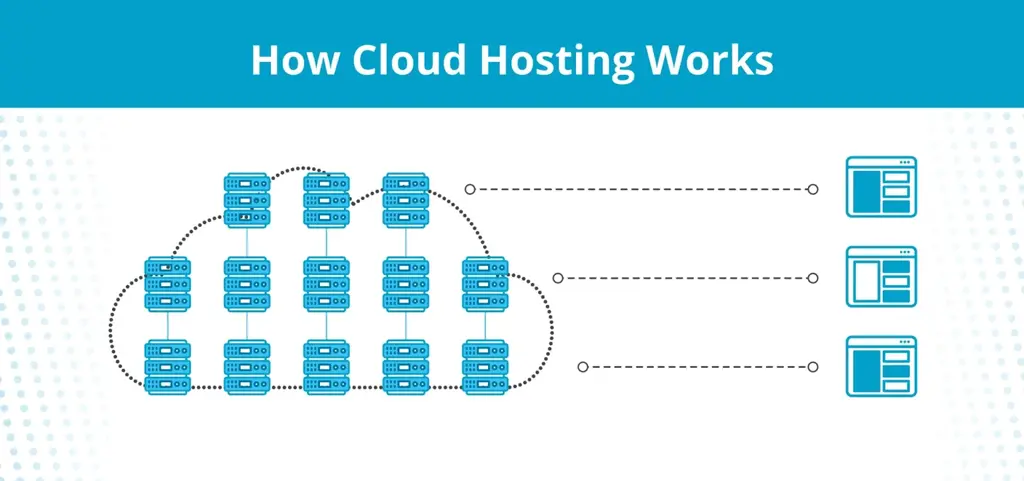

Cloud hosting is a broad term for a number of web hosting services that provide access to a server, or network of servers, via remote access. Cloud hosting is popularly defined as a hosting service that uses a network of virtual and physical servers, but the term has expanded as cloud technology and hosting options have evolved.
Today, cloud hosting may refer to a network of connected servers or to cloud-based access to hosting resources on a single, remote server.
Cloud hosting works because of virtualization technology, which allows hosting providers to create virtual versions of computing components, like servers, storage devices, networks, and operating systems.
That means cloud hosting can work by creating a virtual server across a network of different, physical servers. This is the popular understanding of cloud hosting and how it works, and it’s beneficial for distributing resources and improving security at the server level.
Virtualization also means that a hosting provider can create multiple virtual machines on a single physical server. Customers lease those virtual machines to enjoy the flexibility of cloud hosting, at a fraction of the cost.
In general, cloud hosting works by storing the files and data for your website in a remote server (or network of servers) that are managed and maintained by the hosting provider. You access that server via the cloud, through a browser portal or a web panel.
1. Scalability
Cloud hosting allows for easy scaling of resources to match demand. Whether a website experiences sudden traffic spikes or steady growth, cloud hosting can quickly adapt to provide the necessary computing power.
2. Cost
With cloud VPS hosting, users only pay a fraction of the cost typically required for the purchase, maintenance costs, electricity, software (O/S), and employees or contractors to maintain a business class server.
3. Security
Cloud hosting offers advanced security measures, including regular backups, firewalls, and encryption. The distributed nature of cloud hosting also provides an extra layer of protection against hardware failures and DDoS attacks. All of our cloud VPS servers have four layers of protection.
1. Public facing Cisco ASA firewalls
2. Linux VPS / CSF firewall
3. Windows Desktop firewall
4. Windows Desktop Anti-Virus, Malware software
Our VPS servers are distributed between data centers in Michigan, Arizona, and Amsterdam.
4. Flexibility
Cloud hosting enables clients to customize their hosting environment to meet specific needs. This flexibility allows for easy deployment of various applications and services without being constrained by physical or software limitations. Example: We offer Windows Cloud VPS in addition to Linux Cloud VPS. If you are running Active Directory on your "in-office" Windows server, we can add ADaaS (Active Directory Domain Services) to your new Windows Cloud server so we can "unjoin" your windows desktops from your existing Windows Server and join them via RDP/ADaaS to your new Windows VPS.
5. Performance
Cloud hosting can deliver superior performance compared to traditional hosting methods by distributing resources across multiple servers or using virtualized servers on a single machine. These architectures ensure faster load times and better handling of high-traffic situations. You may require additional resources such as RAM and CPU during peak traffic times of the year. No problem. This is a small upscale.
6. Time to market
Cloud hosting significantly reduces the time required to deploy new applications or websites. With instant provisioning of resources, businesses can quickly launch new projects and respond to market demands more efficiently. If you need a new website or an old one modified, a VPS server makes the task much faster and easier. All you need to do is let us know what you need. We have experts in web design, DNS, php, javascript, and sql on staff.
7. Data Protection
Cloud VPS Acronis Cyber Backups. Our clients can leverage Acronis to backup their data off-server and off-site for maximum protection. Acronis requires virtually zero server resources and it's incremental backup system is very fast.
8. Disaster Recovery
This is where cloud VPSs really shines. If your business burns or a tornado hits, we can have your employees up and running the next morning. You business will go on while you look for a new office. Once you secure it, we can install a new network, new PCs., printers, phones, etc., fully tested and ready to go depending on external carrier services installation scheduling. vbLogic handles all of this, taking the stress off of you.
Our cloud dedicated servers, cloud VPS hosting, and WordPress hosting all leverage advanced virtualization technology to allocate resources efficiently and ensure optimal performance. Supported by a 30-day money-back guarantee. These are example configurations, designed to save you money. The following configurations are Linux based followed by Windows based VPSs.
We offer HIPPA certified servers!
24 Gig RAM
$175/mo
Alma Linux
$125 Setup
28 GIG RAM
$225/mo
Alma Linux
$125 Setup
32 GIG RAM
$275/mo
Alma Linux
$125 Setup
Cloud resources, like servers, storage, and networks, can be easily provisioned and scaled up or down based on your changing needs.
We manage the underlying infrastructure, including hardware, networks, storage, and virtualization layers, freeing you from low-level tasks.
Our team handles disaster recovery solutions to protect your data and applications. If you experience a disaster, your employees can work from home until your new office is established. We offer new network installation and we can deliver and configure new employee pcs within two days.
We can implement measures, like network monitoring, intrusion detection systems, regular patching and updates, problem detection and remediation for your local network. All problems found are automatically logged and a ticket is created. You recieve a detailed report at the end of each month.
Our team monitors the performance, health, and availablity of your cloud infrastructure and performs maintenance tasks as needed. This also includes all computers and printers at your work location. Our network monitoring system uses AI to monitor the health of all devices and will remotely repair detected anomolies.
Traffic can be automatically distributed across multiple servers, and resources can be scaled up or down based on demand. Example: If you run POS software on your server and traffic doubles during Christmas, your server will automatically sense and adjust processing power, e.g. RAM and CPU requirements.
Our highly trained technicians provide support that's responsive and helpful in ways automation can't be. We offer several support tiers to fit your needs. All include a fully responsive help desk. We also maintain a 24 x 7 knowledge base that contain the questions and answers to most questions.
Our experienced migration team can help you transition
to vbLogic Business Solutions with minimal downtime.